Inside Diary of a Bride

Your whole business.
One diary.

Weddings and bridal parties, special occasions, lessons, workshops, salon appointments and jobs on location. Bookings, clients, contracts, payments and your team all run from one place, and every part of it looks like your brand.

14 days freeNo lock-in contractsWe never take a cut of your bookings

The Diary of a Bride calendar on a phone, showing a three day view with special occasion bookings and a wedding package
Does this sound familiar?

Is your business running you?

Tick anything that sounds like your week. We'll show you exactly where it gets fixed.

This week, honestly:

If you're nodding your head, you're not alone.

Nothing ticked yet.

Tick anything on the list and its fix shows up here, with a link straight to the feature that handles it.

Kate, founder of Diary of a Bride
The woman behind the diary
Why it exists

I know exactly how that feels, because I lived it.

I remember sitting in my car at 5am trying to work out:

  • Have they paid?
  • Did I send the contract?
  • Which service did they book?
  • What details am I missing?

I was fully booked, raising two children and spending hours every week buried in admin instead of focusing on my clients and growing my business. The more bookings I took, the more chaotic it became. I knew there had to be a better way.

So I created Diary of a Bride. Not as a tech company. As a beauty professional who needed one place for bookings, clients, communication, payments and growth.

KateFounder, Diary of a Bride

Not just weddings

Bridal is where we started. It isn't where we stop.

Most businesses take three or four kinds of booking. They all live in the same diary, each with its own services, pricing, forms, payment rules and reminders. Choose one to see an example of how it can run.

Weddings & bridal parties

From the first enquiry to the last touch up. Every person in the bridal party, every start time, every location, the trial and the day itself, all held in one booking.

An example flow

  1. Enquiry form
  2. Proposal & contract
  3. Deposit
  4. Trial
  5. Balance
  6. Run sheet
  7. The day

Features doing the work

WeddingSat 14 Mar

Olivia & Tom

Bridal party of 6 · Hair & makeup · On location, Currumbin

  • ContractSigned
  • DepositPaid
  • TrialDone, 12 Feb
  • Run sheetShared
  • BalanceDue 2 weeks prior

These are examples only. Services, forms, payment rules and reminders can all be set up to suit the way you work.

Customised to your workflow

Your client journey, your way.

Every business works differently. Your workflows and client journeys can be completely customised to suit the way you work. The journey shown here is just one example of how Diary of a Bride can bring everything together.

Try a few options and watch the example change.

1How do new clients reach you?
2What locks in the date?
3How do clients pay?
4Before the appointment, you need… (pick any)
5How should reminders go out?

An example client journey Example only

12 steps. You're hands-on for 2.

    Everything marked automatic happens without you opening your laptop. Your own journey can include whichever steps suit your business.

    “It took me about half a day to set everything up. Once my services, contracts, email flows and enquiry forms were connected, everything started running automatically.”

    Ellen, hair and makeup artist
    Every feature

    Everything it takes to run the whole business.

    Everything below is on every plan, unless it's tagged Pro + or Teams

    01Bookings

    Bookings, your way.

    The old wayEnquiries in Instagram, bookings in your notes app, and a calendar only you can read.

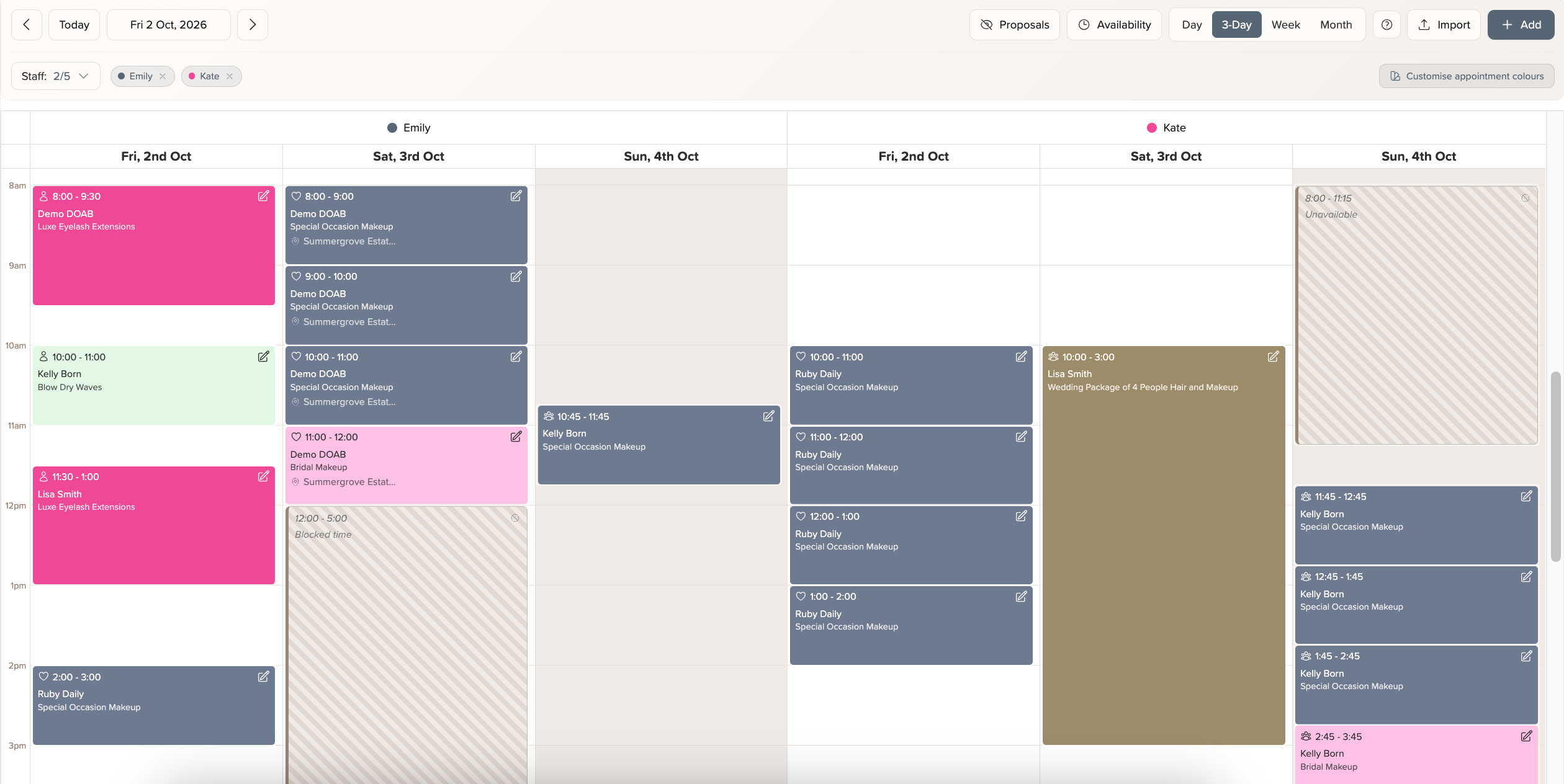
    Take direct online bookings, enquiry forms, or both. Put one booking link in your bio, embed your forms on your own website, or run everything without a website at all. Set the days, hours and places you work, in studio or on location, and clients only ever see times you're genuinely free.

    • Online booking link for your bio and socials
    • Custom enquiry forms, embedded on your site
    • On-location and in-studio bookings
    • Wait lists and availability controls
    • Google Calendar sync Pro +
    • Custom calendar colours Pro +

    “Completely transformed how I manage all my bookings. Everything is in the one place now, and it makes my services feel far more professional.”

    Emily, makeup artist
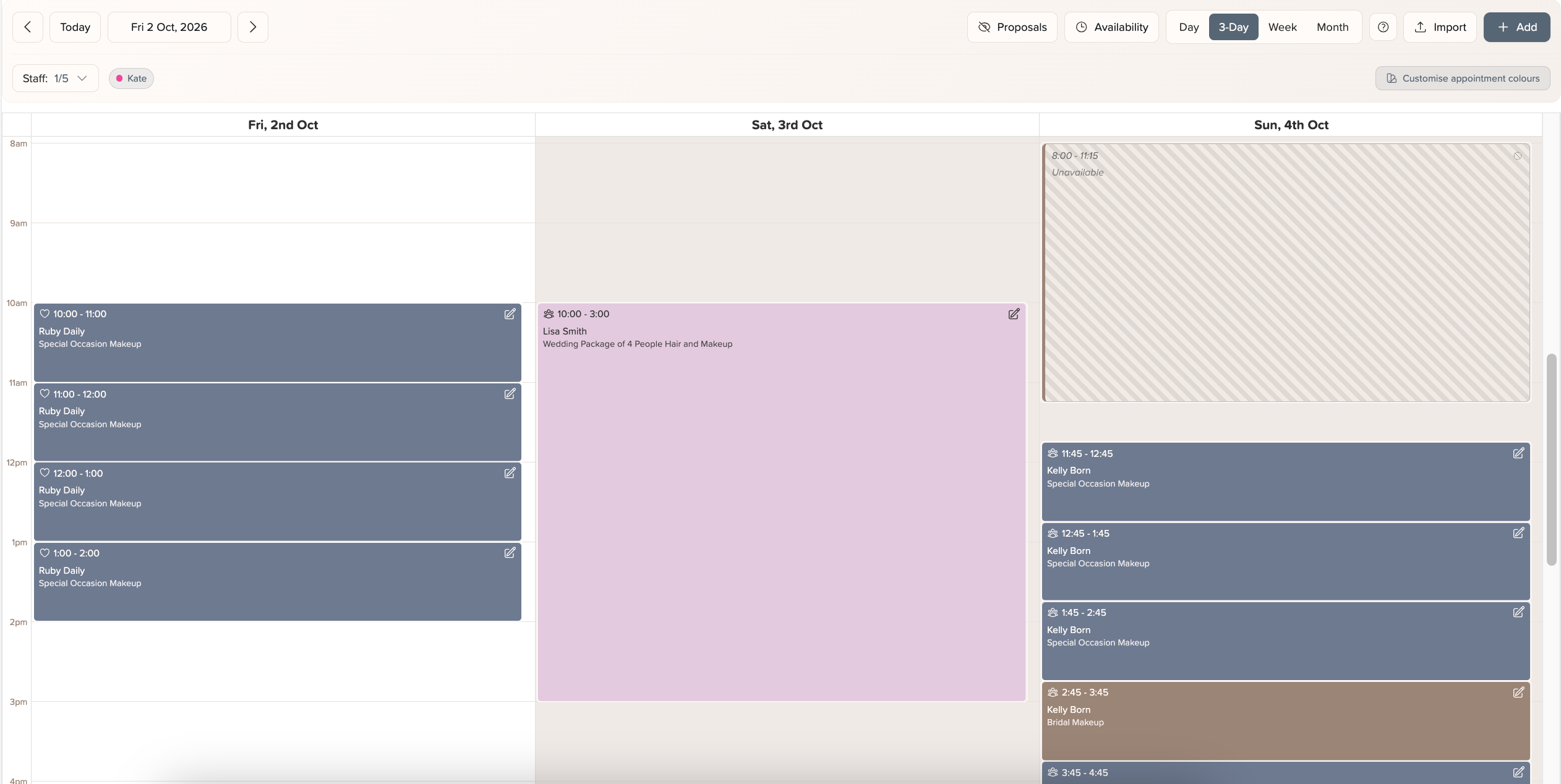
    Diary of a Bride bookings calendar

    02Services

    Services designed around your business.

    The old wayOne price list trying to cover a bridal party, a makeup lesson and a blow wave.

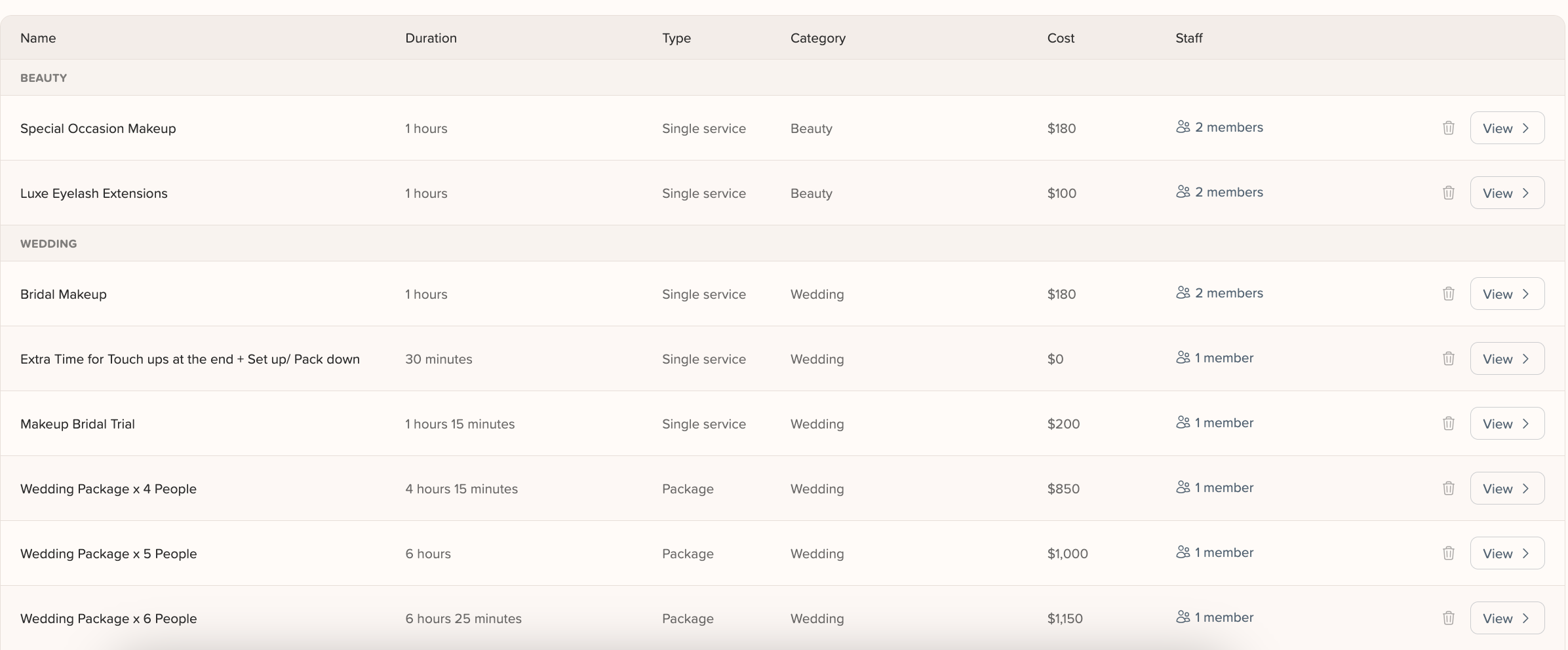
    Build your services the way you actually sell them. Set prices, durations, availability and which staff can do what. Bundle services into packages, add extras, and set rules for each one, so a wedding and a regular's blow wave don't have to book the same way.

    • Services, packages and add-ons
    • Rules for each service
    • Individual and group bookings
    • Staff allocated per service
    • Gift vouchers
    Services and packages setup

    03Client portal

    Their side of the booking, beautifully kept.

    The old wayContracts lost in inboxes and inspo photos buried in forty screenshots.

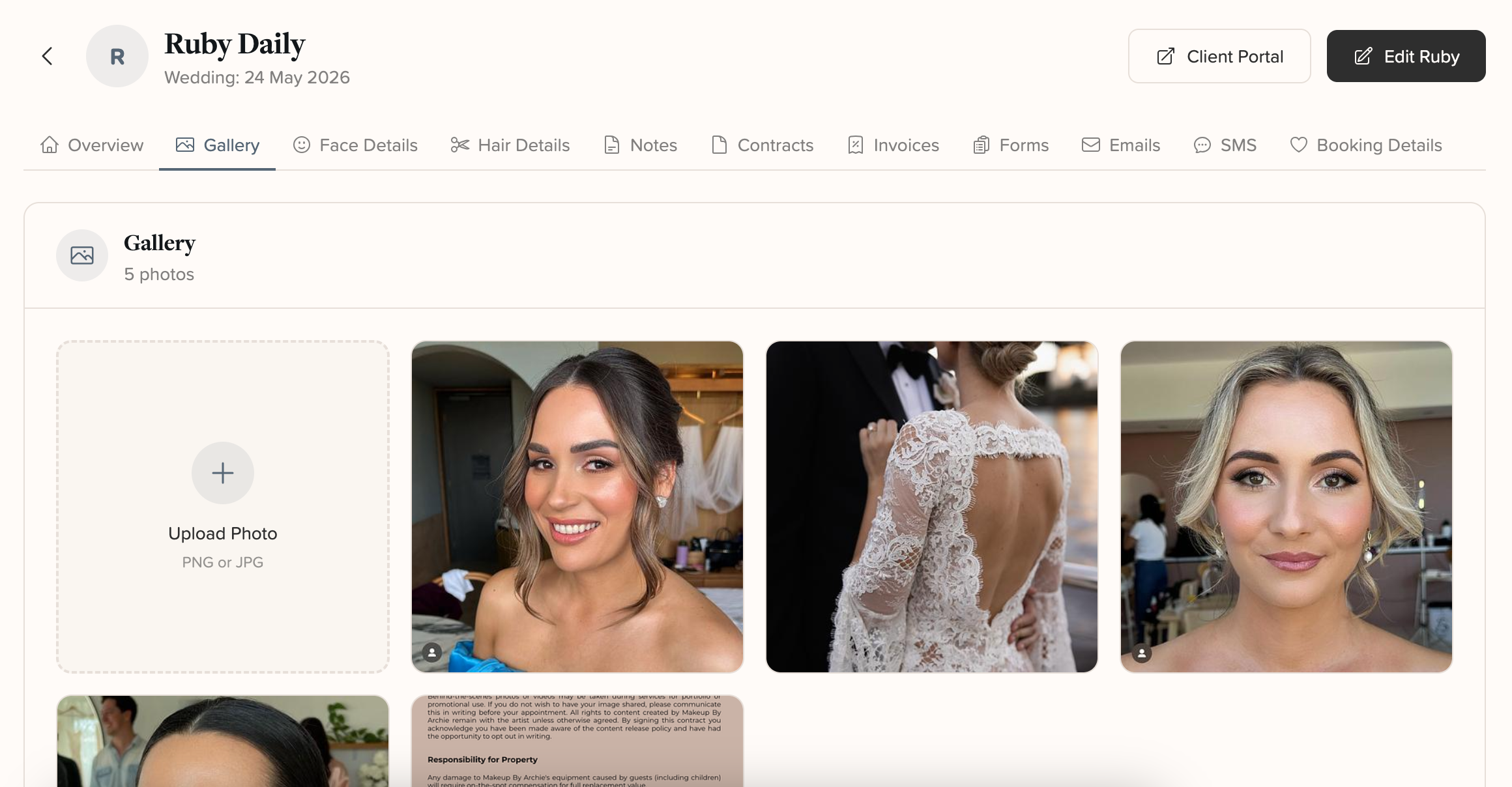
    Every client gets their own portal. They sign contracts, pay invoices, fill in forms, upload inspiration photos, check their appointment details and message you directly. It's free for them, unlimited for you, and it carries your logo and colours, not ours.

    • Contracts, invoices and forms in one place
    • Inspiration gallery and photo uploads
    • Appointment details and run sheets
    • Two-way Message Centre
    • Fully branded portal Pro +

    “My clients love the portal because they can upload their inspiration photos and details themselves, and I feel so much more organised leading into the day.”

    Amy, bridal hairstylist
    Client portal, what your client sees
    Client portal, what you see as the vendor

    04Contracts & payments

    Paid, signed, sorted.

    The old wayHave they paid? Did I send the contract? Did I follow up that quote?

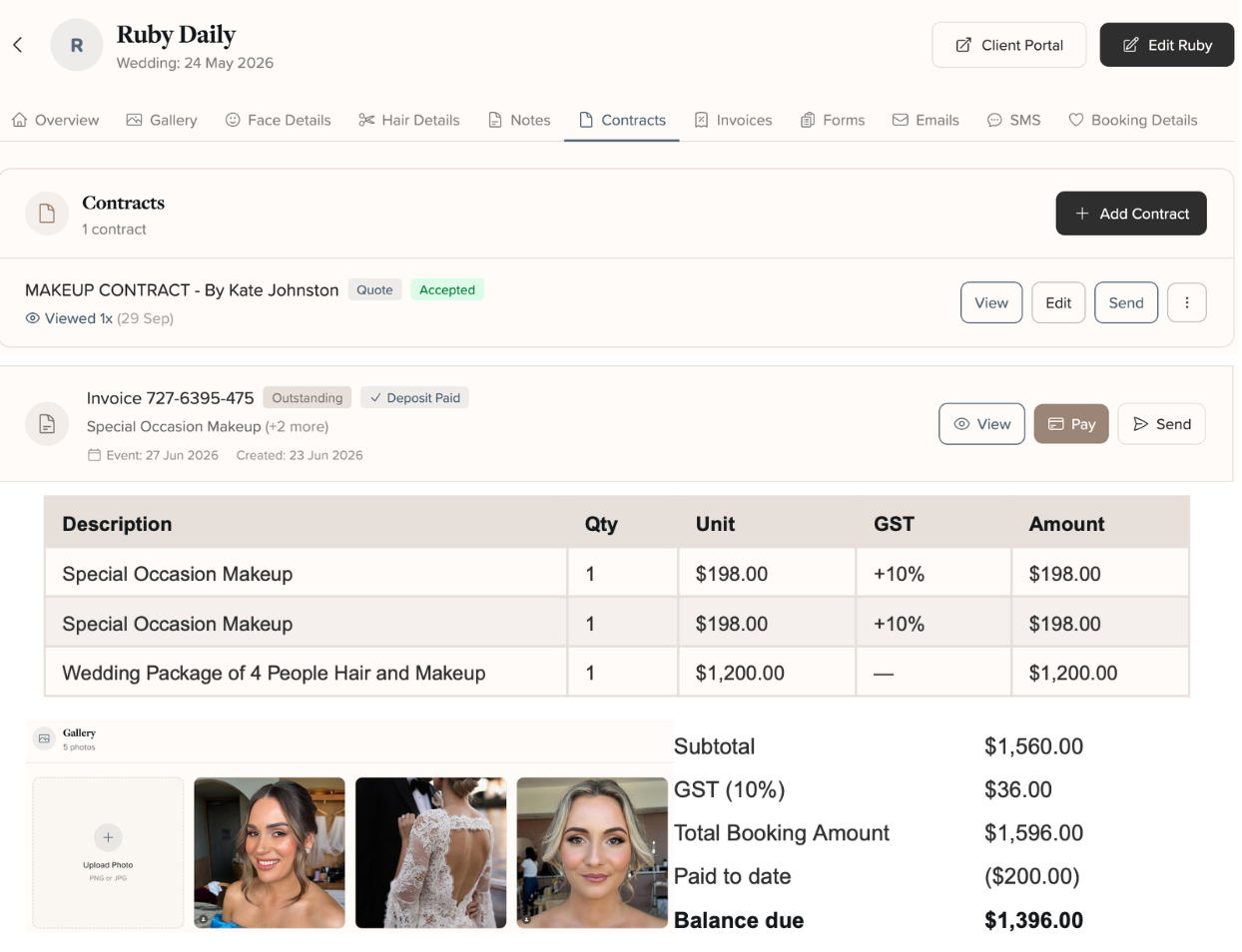
    Send proposals, contracts and invoices from templates written in your own words, then take payment however suits you: bank transfer, cash, your own EFTPOS machine, or connect Stripe if you'd like card payments to run automatically. Plenty of vendors take the deposit through Stripe and the balance by bank transfer, to keep processing fees down.

    • Proposals, contracts and invoices
    • Unlimited templates, in your wording
    • Booking fees and deposits
    • Bank transfer, cash, EFTPOS or card
    • Optional Stripe integration for automated payments
    • Outstanding balances at a glance

    “Every client has their own portal now. Easier to communicate, share details, find payments and contracts, and stay organised. It's clearly built by someone who does this work.”

    Madellin, hairstylist
    Contracts and payments

    05Communication

    Every message, in one place.

    The old wayTyping the same reply for the fortieth time this month.

    Manage enquiries, messages, quotes, reminders and follow ups from one place. Write your emails once, decide when they send, and every client hears from you at the right moment, in your voice. Every email is saved against the client, so you can always see exactly what went out.

    • Email templates and automations
    • Custom forms and questionnaires
    • Message Centre with full email history
    • Email appointment reminders
    • SMS reminders, 200 included monthly Pro +

    “The perfect balance between automation and genuine connection.”

    Sarah, makeup artist

    Wedding automations

    Example

    Thank-you reply to a new enquiry
    Confirmation, contract and invoice
    Questionnaire and inspo request
    Reminder by email or SMS
    A thank-you note, in your words

    06On the day

    Never wonder what you used again.

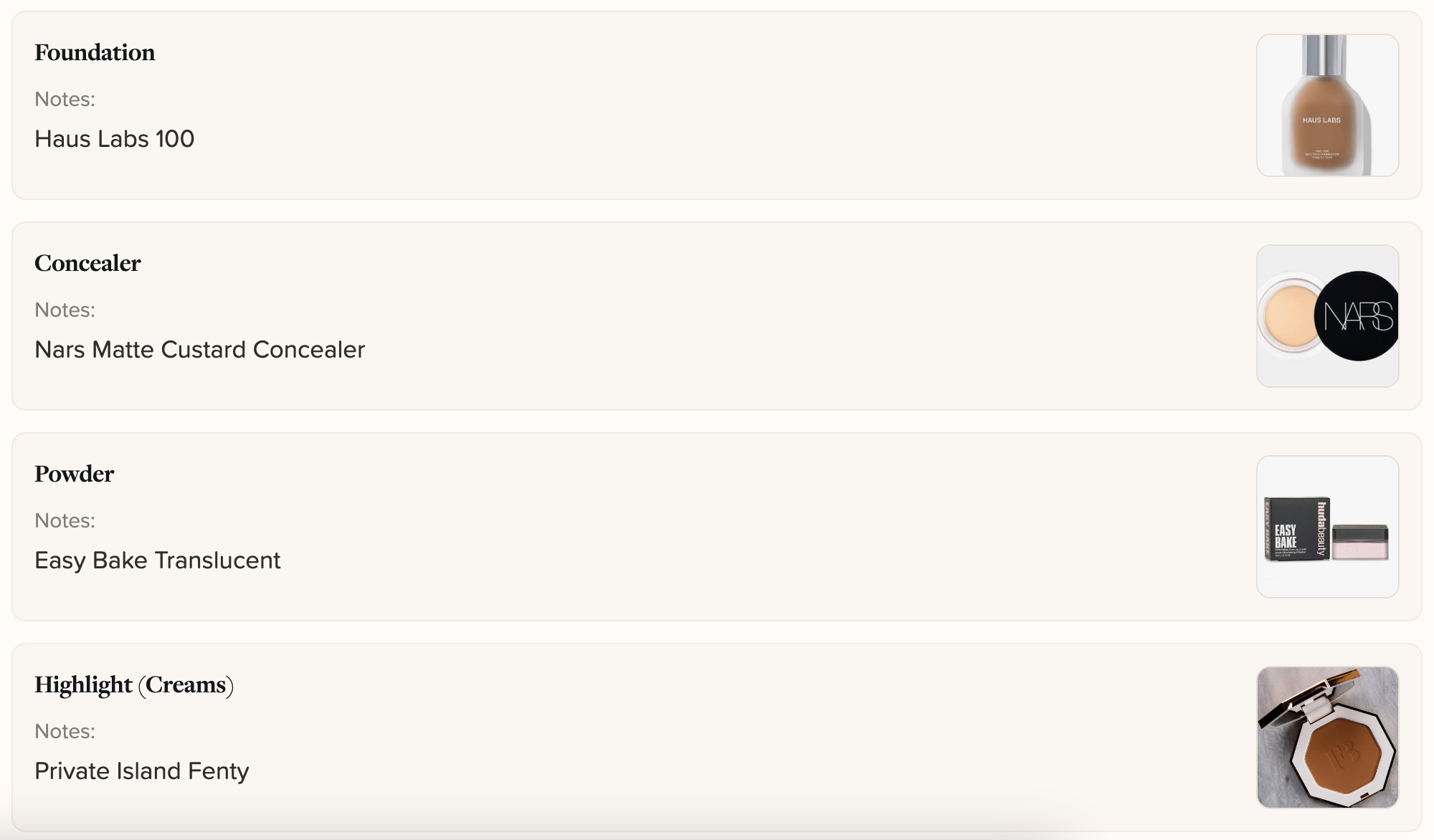
    The old wayScrolling your camera roll to work out which foundation you used at the trial.

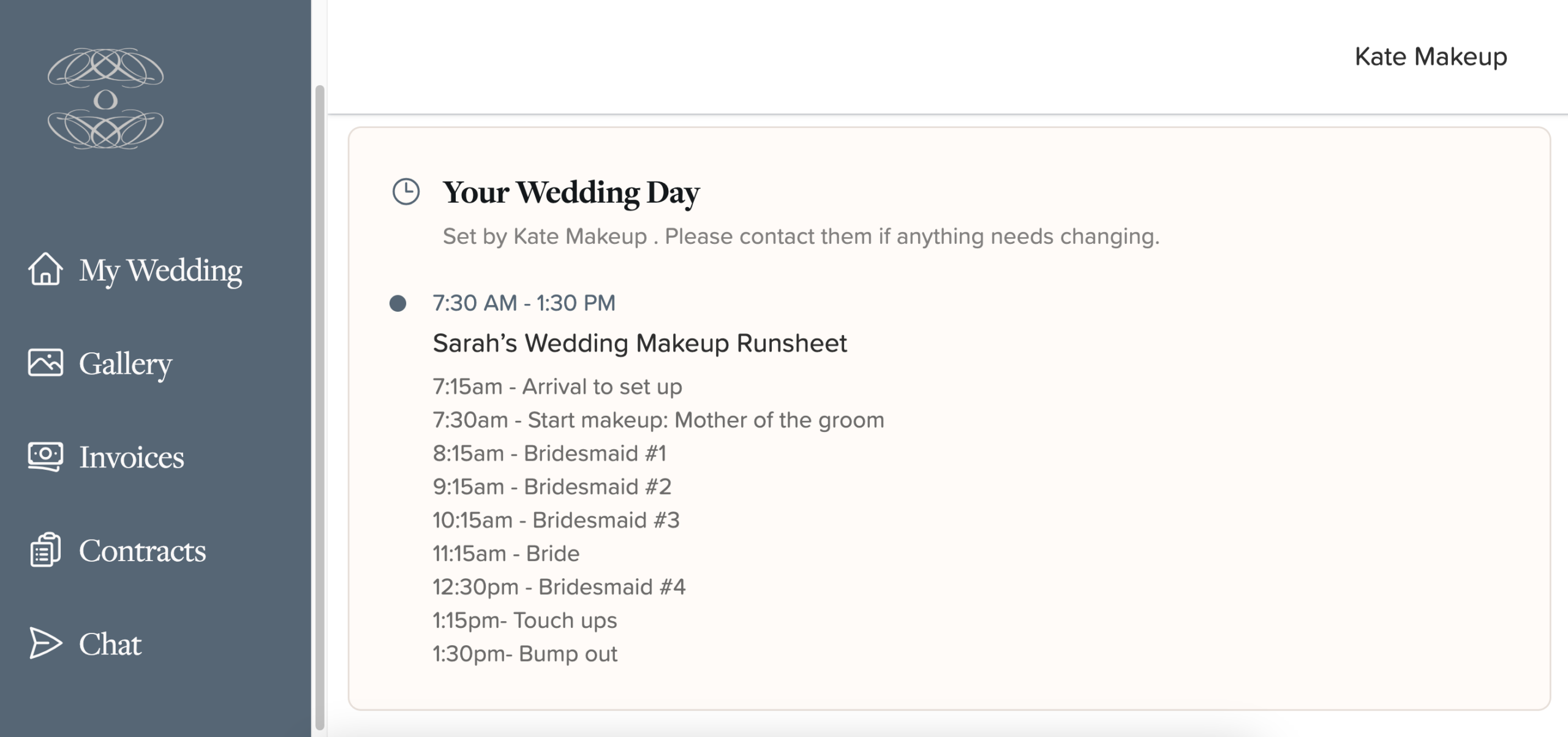
    Build day schedules and run sheets for bridal parties and group bookings, then share them with your client and your team. Record face and hair charts, note the products you used, and recreate any look with confidence. Keep an eye on stock, and restock before you run out, not the night before.

    • Day schedules and run sheets
    • Face and hair charts
    • Product tracking and restock lists
    • Shared product and stock Teams

    Olivia's wedding

    Example

    Artists arrive and set upElla, Jess
    Chloe, bridesmaid · HairElla
    Anne, mother of the bride · MakeupJess
    Ruby, bridesmaid · Hair & makeupElla
    Olivia · Hair & makeupElla, Jess
    Touch ups, then photosEveryone

    Shared with Olivia and your team

    On the day run sheet

    07Your team

    Built for solo artists and growing teams.

    The old wayGroup chats, double bookings and the classic “who’s doing the 6am?”

    Create staff accounts, assign bookings, manage availability and set permissions for owners, managers and staff. Everyone sees what they need, and you keep an eye on everything.

    • Staff management and permissions
    • Team calendars, no double bookings Teams
    • Owner, manager and staff roles Teams
    • Assign bookings and manage availability Teams
    • Business-wide analytics Teams
    Team calendar and staff

    08Your numbers

    Know your numbers, grow your business.

    The old wayAdding up the month's bookings on your phone calculator. Again.

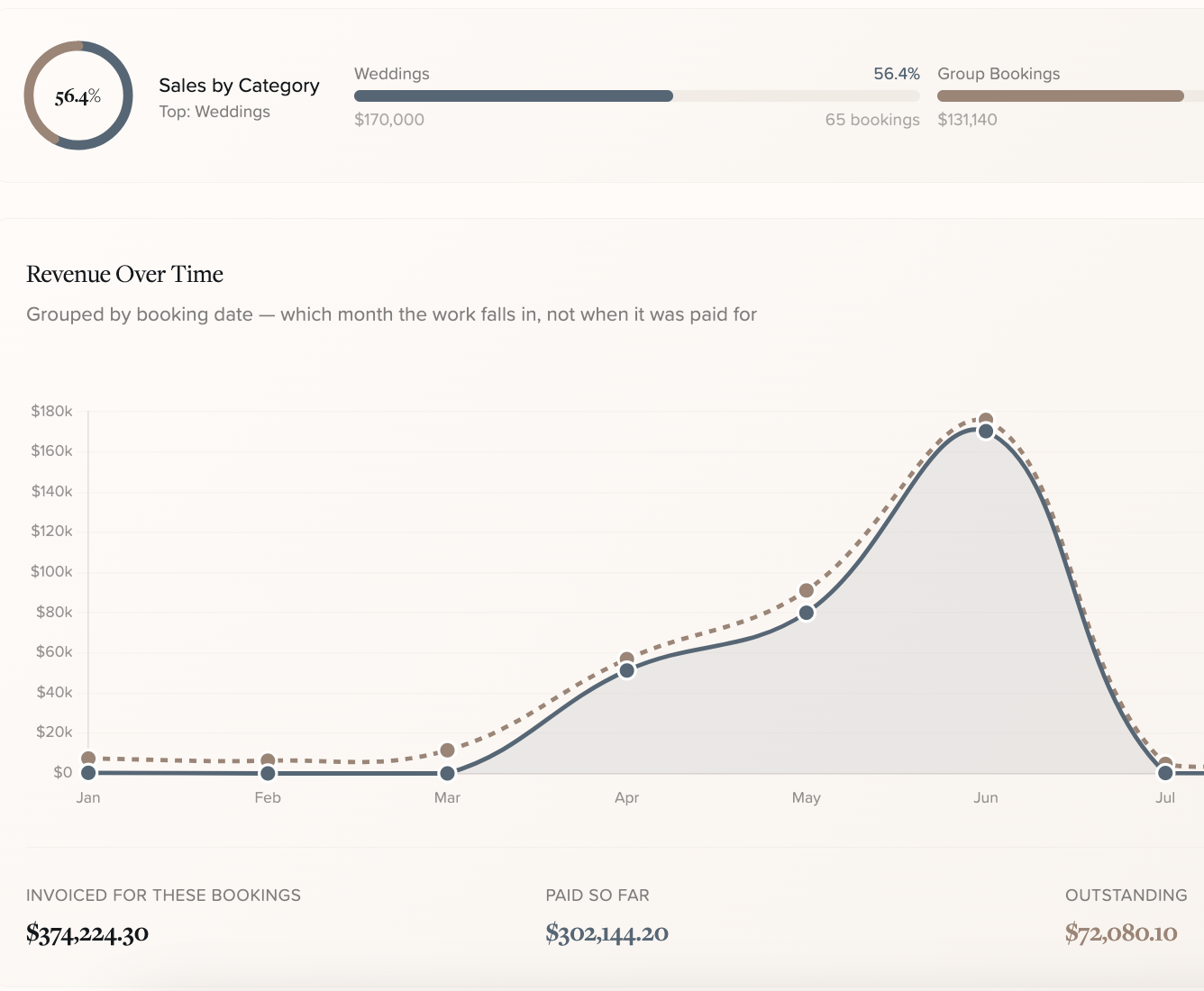
    Financial analytics come with every plan. See your sales and revenue at a glance: what's booked, what's been paid, what's still to come and which services bring in the most. Set reports to run on a schedule, and pull your end-of-year reports when tax time comes around. On Pro +, add expense tracking to see your profit and loss as well.

    • Financial analytics: sales and revenue
    • Sales and revenue reporting
    • Scheduled reports
    • End-of-year reports
    • Expense tracking for profit and loss Pro +
    Revenue and reporting dashboard
    No hidden fees

    No hidden fees. Here's the receipt.

    You pay for the people using the software, not the work you put through it. Every plan includes unlimited bookings, unlimited clients and unlimited client portals.

    Diary of a Bride doesn't charge payment fees. Take payment by bank transfer, cash or your own EFTPOS machine, or connect Stripe for automated card payments, in which case Stripe's own processing fees apply. SMS reminders are included on Pro + and Teams, 200 a month.

    Compare plans

    Diary of a Bride

    What you won't pay for


    Commission on bookings$0.00
    Fees on new clients$0.00
    Payment fees from us$0.00
    Per-booking charges$0.00
    Client portal logins$0.00
    More clients or bookings$0.00
    Exit fees$0.00
    Lock-in contractNone

    Your planfrom $44/mo

    per user, GST included


    No fine print. Keep this for your records.

    The full list

    Every feature, by plan.

    Choose a plan to see exactly what's included, before you sign up.

    Everything below, and which plan it's on.

    Bookings & calendar

    • Online booking link
    • Custom enquiry forms
    • Appointment scheduling
    • On-location & in-studio bookings
    • Wait lists & availability controls
    • Email appointment reminders
    • SMS reminders, 200 monthly Pro +
    • Google Calendar sync Pro +
    • Custom calendar colours Pro +
    • Team calendars, no double bookings Teams

    Client experience

    • Client portal
    • Client galleries & uploads
    • Day schedules & run sheets
    • Face & hair charts
    • Message centre & full email history
    • Fully branded client portal Pro +

    Sales & reporting

    • Proposals, contracts & invoices
    • Booking fees & deposits
    • Bank transfer, cash & EFTPOS
    • Optional Stripe integration
    • Gift vouchers
    • Financial analytics
    • Sales & revenue reports
    • Scheduled reports
    • End-of-year reports
    • Expense tracking, profit & loss Pro +

    Running the business

    • CRM dashboard
    • Email templates & automations
    • Services, packages & per-service rules
    • Product tracking & restock
    • Staff management & permissions
    • Brand customisation
    • Owner, manager & staff roles Teams
    • Assign bookings & availability Teams
    • Shared product & stock Teams
    • Business-wide analytics Teams

    “I finally feel like I'm running a business, not just chasing messages.”

    Ashley, hair and makeup artist
    Done-For-You Setup

    Rather we set it up for you?

    You're time-poor, and moving everything across from your old system is exactly why you haven't switched yet. We build your account around the way your business actually runs: your branding, services and pricing, email templates and contracts in your words, and workflows mapped to your real client journey. Then we bring your client records and future appointments across, so nothing is lost in the move.

    “I just wanted to say a huge thank you for setting everything up for me. It has been looking great and honestly reduced my workload so much.”

    @_makeupbyarchie
    $1,490one off
    Pay in 4 options available
    • Branding, services, pricing and packages
    • Email templates, workflows and contracts
    • Enquiry form and booking calendar, embedded on your site
    • Client details and future appointments imported
    • A 1:1 session to walk you through it all
    Book your setup
    Questions

    Good questions.

    The things people ask us most about what it can do. Something else on your mind? Our full FAQs cover the rest.

    Do I have to be a wedding or bridal business to use it?

    No. It started in bridal, and that's still a big part of who uses it, but it runs any appointment-based service business: salons, studios, mobile and freelance artists, educators, and spray tan and brow techs. If you take bookings, manage clients and send invoices, it fits.

    Can I run different kinds of bookings from one account?

    Yes. Weddings, special occasions, lessons, workshops and salon appointments all sit in the same calendar, each with its own services, pricing, forms and rules.

    Do I need my own website?

    No. Share your booking link on Instagram, Facebook or anywhere else. If you do have a website, embed your enquiry and booking forms so clients never leave it.

    Do my clients pay anything to use the portal?

    No. Client portals are free for your clients and unlimited on every plan.

    What payment options can I use?

    You can choose how you want to accept payments from your clients. Diary of a Bride supports cash, direct bank transfer and Stripe integration, as well as allowing you to use your own EFTPOS machine if you have one.

    If you want your payments to be automated and seamlessly connected to your client workflow, you can connect Stripe. Stripe fees will apply where Stripe is used.

    Many Diary of a Bride vendors choose to take their initial deposit through Stripe and then have the remaining balance paid via bank transfer to reduce payment processing fees.

    Do you take a cut of my bookings?

    No. Diary of a Bride never takes a percentage of what you earn, and we don't add payment fees. If you choose to connect Stripe, Stripe's standard processing fees apply, and those are set by Stripe.

    Can you move my clients across from my old software?

    Yes. Our Done-For-You Setup transfers your client details and future appointments from your previous system, so nothing is lost in the move.

    Can I try it before I pay?

    Yes. You get 14 days of full access. Your card is added at sign up so your account keeps running when the trial ends, and nothing is charged during the 14 days. Cancel any time before then from your account settings.

    Try it on a real
    week of bookings.

    Fourteen days of full access. Load in your services, connect your form and see how the week actually feels. Cancel any time before the trial ends and you won't be charged.

    No lock-in contractsCancel anytimeElite & Pro + include GST

    Have a question first? We'd love to hear from you.

    [email protected]

    Have any

    questions?

    We’re here to help! Whether you need more details about our services or have specific requirements, don’t hesitate to reach out. Our dedicated team is eager to assist you and ensure everything is perfect. Simply drop us a message, and we’ll get back to you as soon as possible.

    Scroll to Top